Storage wars
Cloud traps, fake flash drives and avoiding data disasters... Barry Fox explores the world of digital storage with practical tips on how to keep your music secure and your bank balance unbruised
Storage is like French. What you've got is never enough, especially when you're storing hi-res music and HD video. Storage now comes in Terabytes, thousands of Gigabytes, but it's always easier to press 'Save' than hit 'Delete' and risk regrets. So storage still continues to fill up space.
And yes we are offered the chance to save in 'The Cloud', the misleading name for land-based data centres. But often Cloud companies will give away a few GB for free and then charge high prices for what users don't sort and delete. I'm hoping this column will help music lovers who don't want to be IT experts avoid costly 'mass storage' mistakes.
Spin doctor
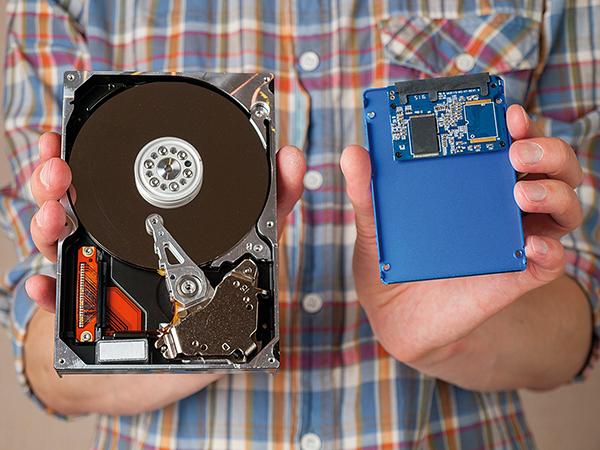
'Old' hard disk drives (HDDs) have spinning magnetic platters. They come in two sizes: 3.5in and 2.5in. 'Old' 3.5in spinners plug into the guts of a computer or network streamer whereas 'newer' 2.5in spinners fit neatly into a small case that slips into your pocket. Spinners are surprisingly robust because their fragile heads are locked when not in use.
Both 3.5in and 2.5in HDDs have the same size connectors (SATA). The pocket cases for 2.5in HDDs often come with a standard USB socket so they plug directly into a computer, a hi-fi amplifier, TV or network box – just like a USB memory stick. A 1TB or 2TB 2.5in USB HDD is a great way to carry around enough entertainment for a lifetime on a desert island.
HDDs of either size can and do fail. Fortunately they often give early warning – a clicking sound caused by the tracking arm hunting data. At the first click, make a safety copy of everything onto a new HDD of the same capacity.
Don't make the mistake of thinking that the latest type of mass storage, Solid State Drive (SSD), will never let you down because it has no moving parts. The memory cells can fail, without warning clicks. Be smart and duplicate everything on two drives, a spinner HDD that stays at home and a carry-around SSD.
The computer world is even worse than the AV world when it comes to standards. At the last count there were a dozen or so different types and sizes of SSD, including several generations of SATA and newer Next Generation Form Factor (NGFF), M.2 PCI-E and NVMe. Needless to say many are not compatible. So be smart and buy your SSD storage ready-fitted in a pocketable casing, one that has a standard USB connector.
SSD prices vary widely. Expect to pay more for faster writing and reading. I'm happy to pay less and leave a copy job running overnight. The big real risk is fake capacity. Scam sellers hook a small amount of memory to a controller chip that pretends it's a large amount. Your equipment then saves music and movies to memory that doesn't actually exist. So it's lost and gone but you don't know until you try to play it.
The hard lesson is to buy your storage from a reputable source. It will then be far easier to get your money back on a dud. But how to tell a dud?
Filling a new SSD and then trying some random plays is time-consuming and hit-or-miss. It's far better to use one of the test programs ('apps' in modern parlance) that can be downloaded for free online. Some apps check every memory cell on an SSD but take around a day per TB to do it. Others do carefully spaced sample checks. I found that FakeFlashTest, for instance, can check 2TB in half an hour (https://fakeflashtest.en.softonic.com).
Clean sweep
Be warned, though. Using apps like this requires some skill. You can download the wrong app and wipe the wrong drive. Far better to find a somewhat nerdy friend, family member or work colleague. Hand them a USB drive and buy them a drink to test it. They will very likely enjoy the idea of catching out a scammer.
But before buying more HDD or SSD storage, play the simple trick of weeding out duplicate copies that grow like fungus inside any storage system. I use Duplicate Cleaner (https://www.digitalvolcano.co.uk/duplicatecleaner.html) to de-clutter my data garden.



















 SPONSORED VIDEO







| Equipment Reviews |  |
Music Reviews Awards | |
Latest News Features | |
Resources Newsletters | |
Subscriptions |
WHERE TECHNOLOGY BECOMES ENTERTAINMENT
 © 2026 Hi-Fi News
AVTech Media Ltd
All rights reserved